Introduction
Cloud Computing Service Models are the foundation of modern IT infrastructure and digital transformation. Businesses across industries rely on Cloud Computing Service Models to build scalable, secure, and cost effective applications without investing heavily in physical hardware.
Understanding Cloud Computing Service Models helps organizations choose the right balance between control, flexibility, and operational responsibility.
In this blog, we’ll break down cloud computing service models, their features, benefits, use cases, and real world examples.
What Are Cloud Computing Service Models?
Cloud Computing Service Models define how cloud services are delivered to users and how responsibilities are shared between the cloud provider and the customer. Each model offers a different level of management, control, and abstraction.
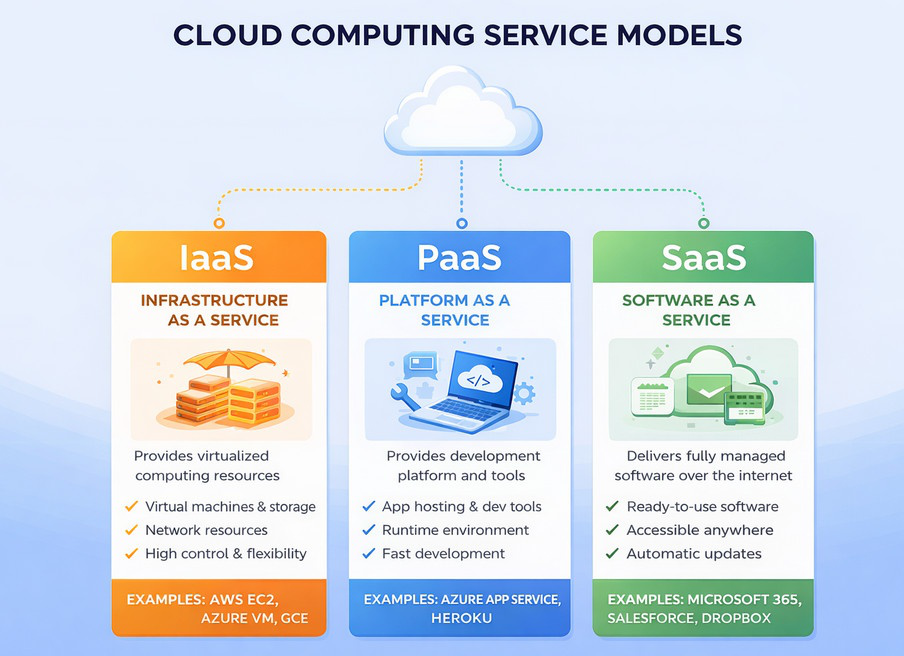
The three primary Cloud Computing Service Models are:
- Infrastructure as a Service (IaaS)
- Platform as a Service (PaaS)
- Software as a Service (SaaS)
1. Infrastructure as a Service (IaaS)
Infrastructure as a Service is one of the most flexible Cloud Computing Service Models, offering virtualized computing resources such as servers, storage, and networking.
Key Features of IaaS
- On-demand virtual machines
- Scalable storage and networking
- Full control over OS and applications
- Pay as you go pricing
Benefits of IaaS
- High flexibility and customization
- Ideal for lift and shift migrations
- No hardware maintenance
- Scales easily with demand
Common IaaS Use Cases
- Web hosting
- Disaster recovery and backup
- Development and testing environments
- Enterprise workloads
Popular IaaS Examples
- Amazon EC2 (AWS)
- Microsoft Azure Virtual Machines
- Google Compute Engine
2. Platform as a Service (PaaS)
Platform as a Service is a developer focused option among Cloud Computing Service Models, enabling application development without managing servers or runtime environments.
Key Features of PaaS
- Managed runtime environments
- Built in scalability
- Integrated development tools
- Automated updates and patches
Benefits of PaaS
- Faster application development
- Reduced operational overhead
- Focus on code, not infrastructure
- Improved developer productivity
Common PaaS Use Cases
- Web and mobile application development
- API development
- Microservices and cloud-native apps
Popular PaaS Examples
- Azure App Service
- AWS Elastic Beanstalk
- Google App Engine
- Heroku
3. Software as a Service (SaaS)
Software as a Service is the most user-friendly of all Cloud Computing Service Models, delivering ready to use applications over the internet.
Key Features of SaaS
- Ready to use applications
- Automatic updates
- Accessible from any device
- Subscription based pricing
Benefits of SaaS
- No installation or maintenance
- Rapid deployment
- Lower upfront costs
- Easy scalability
Common SaaS Use Cases
- Email and collaboration tools
- CRM and ERP systems
- File storage and productivity apps
Popular SaaS Examples
- Microsoft 365
- Google Workspace
- Salesforce
- Dropbox
Cloud Computing Service Models Comparison Chart
| Feature | Infrastructure as a Service (IaaS) | Platform as a Service (PaaS) | Software as a Service (SaaS) |
|---|---|---|---|
| Definition | Provides virtualized infrastructure resources | Provides platform to build and deploy apps | Delivers ready to use software |
| User Control | High (OS, runtime, apps) | Medium (apps & data) | Low (only usage) |
| Infrastructure Management | User managed | Cloud provider | Cloud provider |
| Scalability | High | High | Very High |
| Development Speed | Medium | High | Very High |
| Customization | High | Medium | Low |
| Cost Model | Pay as you go | Subscription / usage based | Subscription based |
| Technical Skill Required | High | Medium | Low |
| Security Responsibility | Shared | Mostly provider | Provider |
| Best Use Case | Migrations, custom workloads | App development & APIs | Business productivity tools |
| Target Users | IT teams, system admins | Developers | End users |
| Examples | AWS EC2, Azure VM, GCE | Azure App Service, Heroku | Microsoft 365, Salesforce |
How to Choose the Right Cloud Service Model?
Choosing the right cloud computing service model depends on:
- Level of control required
- Technical expertise of your team
- Budget and scalability needs
- Application complexity
Quick guide:
- Choose IaaS if you need full control over infrastructure.
- Choose PaaS if you want faster development with less management.
- Choose SaaS if you want ready-to-use software with minimal effort.
Conclusion
Understanding cloud computing service models is key to building efficient, scalable, and cost effective cloud solutions. Whether you choose IaaS, PaaS, or SaaS, each model offers unique advantages that align with different business and technical needs.
As cloud adoption continues to grow, selecting the right service model can significantly impact your organization’s agility, performance, and success.
Check out our detailed blog on Introduction to Cloud Computing.
What’s Next?
We’re here to support you! Should you have any questions or need assistance, don’t hesitate to get in touch with us. Contact us at info@uranuscloudsolutions.com and we’ll be happy to help. Your satisfaction is our priority